

Integrate the forms of your WordPress website, with this plugin that in conjunction with FormsCRM, allows you to send the forms directly to the CRM Open Source vTiger.
It currently allows the creation of forms for vTiger modules.
Steps to follow
The steps to manage this plugin are very simple:
- Install a form plugin on your WordPress. We currently support GravityForms, ContactForm7 and WooCommerce.
- Install our FormsCRM plugin from the official WordPress repository.
- Install our plugin in your WordPress installation. .
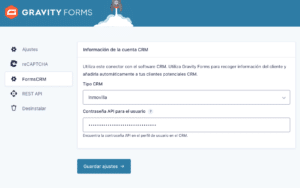
- Use the Settings of each form plugin and select vTiger, and the API password you will find in your user settings.
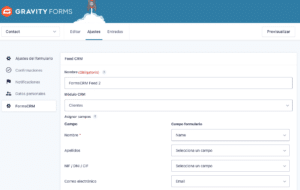
- In each form, you will have to go to your FormsCRM settings, to establish the relationship between the vTiger fields and the fields of your form. Note that vTiger asks for the Name and phone number in order to create the client in your software.
- And there you have it! Every time a form is filled in, it will go directly to your CRM manager.
What is vTiger?
This is a CRM that manages and administers customer relationships. It is a great option for small and medium-sized companies, to achieve the organization of customer information.
It is composed of modules and each of them provides different functions and are grouped by:
- Sales
- Marketing
- Support
- Customer service
- Inventories
And many more!
You can also view this content in: